The workaround for VMware Workstation and Hyper-V are not compatible

Решение проблем VMware

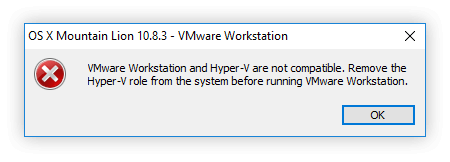
VMware Workstation and Hyper-V are not compatible. Remove the Hyper-V role from the system before running VMware Workstation.

VMware and Hyper-V are not compatible

в консоли от Administrator + перезагрузка:

bcdedit /set hypervisorlaunchtype off

включить обратно:

bcdedit /set hypervisorlaunchtype auto

How to switch off display with PowerShell

Define new static type Utilities.Display

# Turn display off by calling WindowsAPI.
 
# SendMessage(HWND_BROADCAST,WM_SYSCOMMAND, SC_MONITORPOWER, POWER_OFF)
# HWND_BROADCAST  0xffff
# WM_SYSCOMMAND   0x0112
# SC_MONITORPOWER 0xf170
# POWER_OFF       0x0002
 
Add-Type -TypeDefinition '
using System;
using System.Runtime.InteropServices;
 
namespace Utilities {
   public static class Display
   {
      [DllImport("user32.dll", CharSet = CharSet.Auto)]
      private static extern IntPtr SendMessage(
         IntPtr hWnd,
         UInt32 Msg,
         IntPtr wParam,
         IntPtr lParam
      );
 
      public static void PowerOff ()
      {
         SendMessage(
            (IntPtr)0xffff, // HWND_BROADCAST
            0x0112,         // WM_SYSCOMMAND
            (IntPtr)0xf170, // SC_MONITORPOWER
            (IntPtr)0x0002  // POWER_OFF
         );
      }
   }
}
'

Run
[Utilities.Display]::PowerOff()

or via func

function Switch-DisplayOff
{
[Utilities.Display]::PowerOff()
}

©2013 Jakub Jareš
Windows 10 does not reconnect to mapped network drives

Netlogon service doesn’t affect.

Solution:

as Startup script:

C:\Windows\System32\WindowsPowerShell\v1.0\powershell.exe -WindowStyle Hidden -NonInteractive -NoLogo -File C:\Users\Vady\Documents\ReconnectNetworkDrivesAtStartup.ps1

Oneliner to Create Task via PowerShell 3.0+ (Grant Elevated Privileges):

$PS1file = '{0}\ReconnectNetworkDrivesAtStartup.ps1' -f [Environment]::GetFolderPath("MyDocuments");Invoke-WebRequest -Uri 'https://gist.github.com/anderssonjohan/8d3f958f29b4ae5c7802/raw' -OutFile $PS1file;Register-ScheduledTask -TaskName 'ReconnectNetworkDrivesAtStartup' -Description 'http://stackoverflow.com/a/29373760' -Trigger (New-ScheduledTaskTrigger -AtLogOn -User "$env:USERDOMAIN\$env:USERNAME") -Action (New-ScheduledTaskAction -Execute "C:\Windows\System32\WindowsPowerShell\v1.0\powershell.exe" -Argument "-WindowStyle Hidden -NonInteractive -NoLogo -File $PS1file")

PS. For Win7/8 via app: MapDrive.exe (.NET Framework 2.0)

Remove «Windows 7/8 Reserve your FREE upgrade to Windows 10 now» notification

C:\Windows\System32\wusa.exe /uninstall /kb:3035583 /quiet /norestart /log
C:\Windows\System32\wusa.exe /uninstall /kb:2952664 /quiet /norestart /log
C:\Windows\System32\wusa.exe /uninstall /kb:3021917 /quiet /norestart /log
C:\Windows\System32\wusa.exe /uninstall /kb:2976978 /quiet /log /warnrestart:600

Continue reading Remove «Windows 7/8 Reserve your FREE upgrade to Windows 10 now» notification

Windows 10 gets a fresh command prompt and lots of hotkeys

Well, from what I can tell looking at the Preview, there’s a LOT of cool Console goodness coming in Windows 10.

Here’s a list of hotkeys in the Windows 10 Technical Preview console. This is just hotkeys! Be sure to explore the Properties dialog as well, resize, word wrapping, and more. Continue reading Windows 10 gets a fresh command prompt and lots of hotkeys